How to Create a Professional Invoice: Complete Guide (2026)
 KipBill Team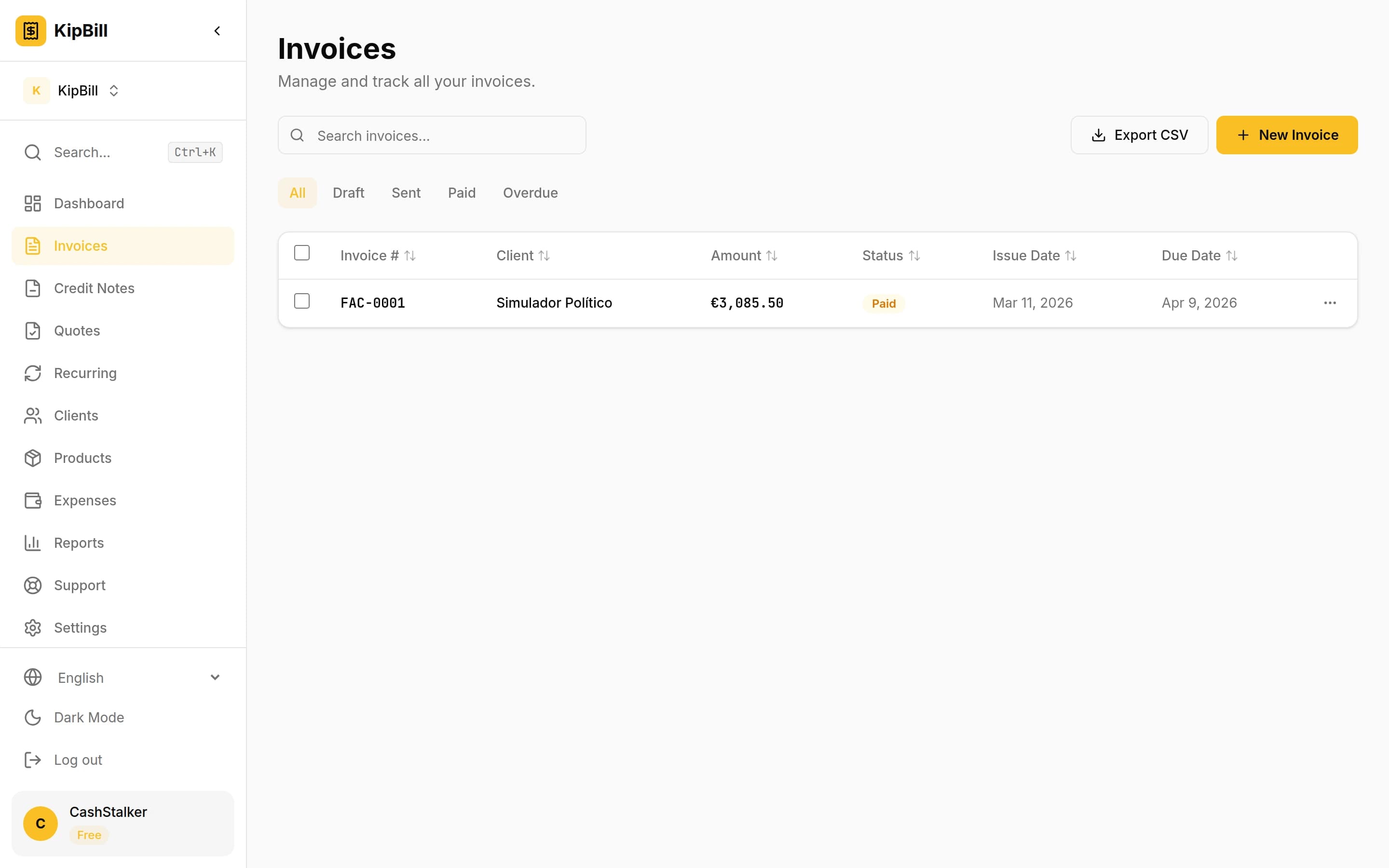
Invoice List
All your invoices in one place
Whether you are a freelancer sending your first invoice or a small business owner looking to tighten up your billing process, the quality of your invoices directly affects how quickly you get paid. A professional invoice is not just a payment request — it is a reflection of your brand, a legal document, and a communication tool all in one.
In this guide, we will walk through every element of a professional invoice, common pitfalls to avoid, and practical tips that help you get paid faster.
What Makes an Invoice Professional?
A professional invoice is clear, complete, and easy to act on. When a client receives your invoice, they should be able to understand exactly what they owe, why they owe it, and how to pay — all within seconds.
Three qualities define a professional invoice:
- Clarity: Every line item is described in plain language with quantities, rates, and totals.
- Completeness: All legally required information is present, including tax IDs where applicable.
- Consistency: Your invoices follow the same format every time, with proper sequential numbering.
Essential Elements Every Invoice Must Include
1. Your Business Information
Start with your business name (or legal name if you are a sole proprietor), address, phone number, email, and tax identification number. This establishes who is requesting payment and gives the client a point of contact.
2. Client Information
Include your client's full legal name or company name, billing address, and any reference numbers they require (such as a purchase order number). Getting this right avoids delays caused by invoices being routed to the wrong department.
Always ask new clients for their preferred billing contact and any internal reference numbers before sending your first invoice. Many companies require a PO number to process payments.
3. Invoice Number
Use a sequential numbering system that never repeats. Common formats include simple numbers (INV-001, INV-002) or date-based prefixes (2026-001). Your numbering must be sequential — gaps or duplicates can cause problems during tax audits.
4. Invoice Date and Due Date
The invoice date records when the invoice was issued. The due date tells the client when payment is expected. Common payment terms include:
- Due on receipt — Payment expected immediately
- Net 15 — Due within 15 days
- Net 30 — Due within 30 days (most common)
- Net 60 — Due within 60 days (common for larger companies)
5. Line Items with Descriptions
Each service or product should be its own line item with:
- A clear description of the work or product
- Quantity or hours
- Unit price or hourly rate
- Line total
Avoid vague descriptions like "consulting services." Instead, write "UX audit and wireframe review — homepage redesign project (March 2026)."
6. Taxes
Apply the correct tax rate for your jurisdiction. Show tax as a separate line so the client can see the subtotal, tax amount, and total clearly. If you are tax-exempt or the transaction is reverse-charged, state that explicitly on the invoice.
7. Total Amount Due
Display the total prominently. This is the single most important number on the invoice. Make it stand out visually so there is zero ambiguity about what the client owes.
8. Payment Instructions
Tell the client exactly how to pay. Include:
- Bank account details (IBAN, SWIFT/BIC for international transfers)
- Accepted payment methods (bank transfer, credit card, PayPal, etc.)
- A payment link if you use online payments
Invoices with a direct payment link get paid up to 3x faster than those requiring manual bank transfers. If your invoicing tool supports online payments, always include the link.
9. Notes and Terms
Use this section for late payment policies, early payment discounts, project-specific notes, or thank-you messages. Keep it concise but include anything that protects you legally.
Common Invoice Mistakes That Delay Payment
Even experienced professionals make mistakes that slow down payments. Here are the most common ones:
Missing or incorrect client details. If the company name is wrong or the PO number is missing, many accounting departments will reject the invoice outright and wait for a corrected version.
Vague line item descriptions. When a client cannot tell what a charge is for, they will ask for clarification before paying. That back-and-forth can add weeks to your payment timeline.
No due date specified. Without a clear due date, your invoice goes to the bottom of the pile. Always state when payment is expected.
Sending invoices late. The longer you wait to invoice after completing work, the longer you wait to get paid. Invoice immediately upon delivery or at agreed milestones.
Not following up. Many freelancers feel awkward chasing payments, but a polite reminder on or shortly after the due date is standard business practice. If you need help wording those reminders, our late payment email templates give you copy-paste scripts for every stage.
Start invoicing for free
Join thousands of freelancers and small businesses who create professional invoices with KipBill.
How to Format Your Invoice for Maximum Impact
The visual presentation of your invoice matters more than you might think. Here are formatting best practices:
Use a Clean, Professional Layout
White space, clear typography, and logical grouping of information make your invoice easy to scan. Avoid clutter, decorative elements, or overly complex designs.
Brand Your Invoices
Include your logo, use your brand colors for accents, and match the overall feel of your other business materials. A branded invoice reinforces your professionalism and makes you memorable.
Send PDF Format
Always send invoices as PDF files. PDFs preserve your formatting across every device and operating system, cannot be accidentally edited by the recipient, and are universally accepted as business documents. If you need a starting point, check out our free invoice template PDFs in five professional styles.
Tips for Getting Paid Faster
Beyond creating a professional invoice, these strategies help you collect payments more quickly:
- Agree on payment terms before starting work. Put terms in your contract so there are no surprises.
- Offer multiple payment methods. The easier you make it to pay, the faster it happens.
- Send invoices on time. Invoice immediately when work is delivered or at agreed intervals.
- Set up automatic reminders. A gentle nudge a few days before and after the due date keeps your invoice top of mind.
- Consider early payment discounts. A 2% discount for payment within 10 days (2/10 Net 30) can motivate faster payment.
- Charge late fees. State your late payment policy upfront. Even a modest fee (1-2% per month) discourages delays.
Automated payment reminders are one of the most effective tools for reducing late payments. Tools like KipBill can send reminders automatically at intervals you choose, so you never have to write an awkward follow-up email again.
Simplify the Process with Invoicing Software
Creating invoices manually in Word or Excel is time-consuming and error-prone. Modern invoicing software handles numbering, calculations, tax rates, and PDF generation automatically.
KipBill, for example, offers 25 professionally designed templates, supports 12 languages, and generates PDFs instantly. You can set up recurring invoices, track when clients view your invoice, accept online payments, and send automatic payment reminders — all from a clean, intuitive interface.
If you are still creating invoices from scratch each time, switching to dedicated invoicing software is one of the highest-impact changes you can make for your cash flow.
Final Checklist
Before sending any invoice, verify:
- Your business name and contact details are correct
- The client's name, address, and reference numbers are accurate
- The invoice number follows your sequential system
- Issue date and due date are clearly stated
- Each line item has a clear description, quantity, rate, and total
- Taxes are correctly calculated and displayed
- The total amount due is prominent
- Payment instructions are complete
- The invoice is saved and sent as a PDF
A professional invoice is not complicated — it just needs to be complete, clear, and consistent. Get these fundamentals right, and you will spend less time chasing payments and more time doing the work you love. For more advanced strategies, see our freelancer invoicing tips, and if you ever need to adjust an issued invoice, learn how to write a credit note correctly.

KipBill Team
Related Articles

Photographer Invoice Guide: What to Include, How to Structure Pricing, and Get Paid on Time
A practical guide to invoicing for photographers. Learn what to put on a photography invoice, how to handle deposits, usage rights, and payment terms by niche.
Invoicing for Personal Trainers and Gyms: Session Packages, Memberships, and Getting Paid Reliably
A complete guide to invoicing for personal trainers, gym owners, and fitness professionals. Learn how to bill for session packages, memberships, group classes, online coaching, and more.
The Complete Freelancer Invoicing Guide: Payment Terms, Late Fees, Retainers, International Clients, and Getting Paid Faster
The ultimate guide to freelancer invoicing. Covers payment terms, late fees, contracts, retainers, international clients, multi-currency billing, taxes, and strategies to get paid faster.
Start invoicing for free
Join thousands of freelancers and small businesses who create professional invoices with KipBill.