Freelancer Invoice Strategies That Prevent Cash Flow Disasters (2026 Guide)

 KipBill Team
You have been freelancing long enough to know how to write an invoice. What you might not know is how much money you are quietly losing because of how you write them — the payment terms you default to, the line items you lump together, the recurring work you invoice manually each month, the international client you billed in the wrong currency. These are not beginner mistakes. They are the invisible leaks that drain thousands from experienced freelancers every year.
This guide covers the invoicing strategies that separate freelancers who chase payments from freelancers who have predictable, healthy cash flow.
The Hidden Cost of Bad Invoicing
Most freelancers think of invoicing as admin work — something you do after the real work is done. That mindset is expensive.
Cash flow gaps are the most obvious cost. When you delay invoicing by even a week, you push your payment date out by that same week plus whatever payment terms you have agreed to. A freelancer billing $8,000 per month who consistently invoices five days late is effectively giving their clients a $1,300 interest-free loan at any given time.
Forgotten invoices are more common than anyone admits. That quick half-hour consultation, the extra revision round you did not scope, the domain renewal you paid for on a client's behalf — these unbilled items add up. Industry surveys consistently show freelancers leave 5-10% of their earned income on the table through unbilled work.
Tax headaches compound the problem. When your invoicing is inconsistent — irregular numbering, missing descriptions, no clear record of what was delivered — you spend hours reconstructing your income at tax time. Worse, you might miss deductions because your invoices do not clearly separate taxable and non-taxable items.
The fix is not working harder at invoicing. It is building systems that make good invoicing automatic.
Invoice Anatomy: What Most Freelancers Forget to Include
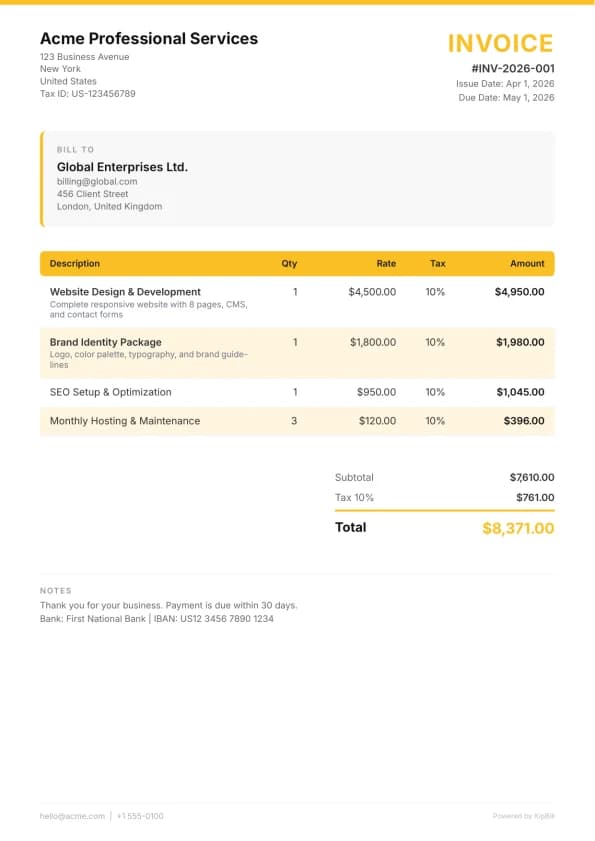
You already know to include your name, the client's name, line items, and a total. Here is what experienced freelancers add that makes a measurable difference in payment speed:
Scope reference. If you are still getting comfortable with the basics, start with our guide on how to create a professional invoice. Once those fundamentals are solid, link every invoice to the specific project, proposal, or contract it relates to. Instead of "Web development — March 2026," write "Web development per SOW-2024-003 — Sprint 12 (March 1-15)." This eliminates the back-and-forth where the client's accounts payable team asks "what is this for?" — a question that delays payment by an average of 11 days.
Project name or phase. Clients with multiple active projects need to allocate costs internally. If your invoice does not specify the project, it gets stuck in an approval queue while someone figures out which budget it should come from.
Direct payment link. Every invoice should include a clickable link that takes the client directly to a payment page. Removing friction from the payment process is the single most effective thing you can do to reduce late payments. If you use invoice software for freelancers, this is usually built in.
Your payment details — all of them. Bank name, account number, routing number, SWIFT/BIC for international transfers, and your PayPal or payment platform handle. Do not make clients email you to ask how to pay.
Add a one-line "Payment received — thank you" note on your invoice template that only appears on the paid version. When clients download their records, they see the confirmation without you having to send a separate receipt.
Pricing Psychology on Your Invoices
How you present your pricing affects how clients perceive the value — and how quickly they approve payment.
Anchor with value, not just hours. If you redesigned a landing page that increased conversions by 30%, your invoice can note that context: "Landing page redesign (conversion-optimized layout, A/B test setup, responsive implementation)." You are not inflating the price — you are reminding the client why the price is justified.
Itemize, do not lump. "Website redesign — $5,000" feels expensive. The same work broken into "UX audit and wireframes — $1,200 / Visual design (3 concepts + revisions) — $1,800 / Front-end development — $1,500 / QA and deployment — $500" feels like a carefully scoped project. Itemization also protects you in disputes because the client approved each component.
Show savings when applicable. If your rate for a retainer client is lower than your standard rate, show it. "Standard rate: $150/hr → Retainer rate: $120/hr" makes the client feel smart about the arrangement and less likely to question individual line items.
Round your totals. A project billed at $4,000 gets approved faster than one billed at $3,847.50. When you have flexibility in scoping, target round numbers. They feel deliberate rather than accumulated.
Payment Terms That Actually Get You Paid
Net 30 is the standard — and it is terrible for freelancers. Here is why: Net 30 means 30 days from the invoice date, but most companies batch their payment runs weekly or biweekly. So your Net 30 invoice actually gets paid in 35-45 days. Add the week you took to send the invoice after finishing the work, and you are waiting 6-7 weeks for money you already earned.
Better alternatives:
- Net 14 is the sweet spot for most freelancer-client relationships. It is short enough to keep your cash flow healthy but long enough that clients do not feel pressured.
- Due on receipt works for small projects under $1,000 and for clients you have worked with long enough to set that expectation.
- 50/25/25 milestones for larger projects: 50% upfront, 25% at midpoint, 25% on delivery. This is non-negotiable for projects over $5,000 — you should never be financing a client's project with your own cash flow.
Late fees that actually work. When invoices do go overdue, having ready-to-use late payment email templates saves you from writing awkward follow-ups from scratch. A 1.5% monthly late fee clause in your contract does two things: it gives accounts payable teams a reason to prioritize your invoice (they do not want to explain unnecessary fees), and it gives you leverage if a payment genuinely goes overdue. Most freelancers never enforce late fees — the point is that they exist as a motivator.
Send a friendly "payment reminder" email 3 days before the due date, not after. This catches invoices stuck in approval before they become overdue. Automating these reminders eliminates the awkwardness of manually chasing payments.
The Retainer Invoice Model
Retainers are the holy grail of freelancing — predictable monthly income with clients who already trust you. But most freelancers structure retainer invoices poorly.
The wrong way: "Monthly retainer — March 2026 — $3,000." This tells the client nothing about what they are getting and invites the question "what did we actually use this month?"
The right way: Invoice the retainer fee as a single line item, then add a usage summary below it — even if the contract does not require it. "Monthly retainer (20 hours included) — $3,000" followed by a note: "Hours used this month: 16. Rollover: 0. Additional hours: 0."
This transparency builds trust and justifies the retainer when the client's CFO reviews expenses at quarter-end. It also protects you: if the client consistently uses 18-20 hours, you have documentation for renegotiating a higher rate.
Invoice retainers on the first of the month, not the last. You are selling access and availability, not past work. Invoicing at the start of the period reinforces that the client is paying for reserved capacity.
Multi-Currency Invoicing for International Freelancers
If you work with clients in other countries, currency decisions affect your bottom line more than you think.
Default rule: invoice in the client's currency. A client in Germany who receives a USD invoice has to think about exchange rates, potentially pay conversion fees, and deal with the mental friction of foreign amounts. Invoicing in EUR removes all of that friction.
The exception: If the client is a large company with a finance team, they likely have USD or EUR accounts regardless of their country. Ask which currency they prefer — they will appreciate it.
Exchange rate tips:
- Lock the exchange rate in your contract for projects longer than one month. "All invoices billed at EUR/USD rate of 1.08, reviewed quarterly" protects both sides from volatility.
- For ongoing work, bill at the rate on the invoice date. Do not try to time currency markets.
- Keep a separate record of the exchange rate used on each invoice. Your accountant will thank you at tax time, and KipBill stores this automatically when you invoice in different currencies.
Invoice Numbering Systems That Survive Tax Audits
Your numbering system needs to be sequential, unambiguous, and scalable. Auditors look for gaps in numbering — a missing invoice number suggests unreported income.
Best format for most freelancers: [PREFIX]-[YEAR][MONTH]-[SEQUENCE]
Example: INV-202603-001, INV-202603-002, INV-202604-001
This format sorts chronologically, makes it obvious which month each invoice belongs to, and resets the sequence each month so numbers stay short.
What to avoid:
- Starting over at 001 each January without a year prefix — you will have duplicate numbers within two years.
- Client-specific prefixes like
ACME-001— these break down when you have 30 clients and cannot sort invoices chronologically. - Random or manual numbering — one skipped number and an auditor will ask where the missing invoice went.
Keep a separate sequence for quotes and credit notes. QT-202603-001 for quotes and CN-202603-001 for credit notes keeps your documents organized without conflicting numbers.
When to Send Invoices: Timing Strategies
The day and time you send an invoice measurably affects how quickly it gets paid.
Tuesday through Thursday mornings are optimal. Monday inboxes are flooded with weekend catch-up. Friday invoices sit unseen until Monday, losing momentum. Mid-week mornings mean your invoice arrives when the client or their accounts payable team is actively processing work.
Send the invoice the same day you deliver the work. The client's perceived value of your work is highest at the moment of delivery. A week later, the excitement has faded and the invoice feels like a chore.
For milestone billing, send the invoice before the next phase begins — not after. "Here is the invoice for Phase 2, and here is the kickoff plan for Phase 3" creates natural momentum.
Start invoicing for free
Join thousands of freelancers and small businesses who create professional invoices with KipBill.
Automating Recurring Invoices
If you have retainer clients or ongoing monthly services, manually creating invoices each month is a waste of your time and a source of errors.
Set up recurring invoices that auto-generate on a fixed schedule — the first of each month, every two weeks, whatever matches your billing cycle. The invoice should be pre-populated with the retainer amount, standard line items, and the client's payment details. KipBill and similar tools let you configure this once and then either auto-send or queue the invoice for review before sending.
What to automate:
- The invoice creation itself (date, number, amounts, line items)
- The delivery email with the PDF attached
- The reminder emails at 3 days before due, on the due date, and 7 days overdue
What to keep manual:
- Any invoice that includes variable usage or overage charges — review these before they go out
- Invoices for new clients where you have not yet confirmed their billing details
- The first invoice under any new rate or contract change
Automation is not about removing yourself from the process. It is about making the default case effortless so you can focus your attention on the exceptions.
Tax Invoicing: What Freelancers Need for Filing
Your invoices are your primary financial records. If they are incomplete, your tax filing will be painful and potentially inaccurate.
Every invoice should capture:
- Tax rate and amount as separate line items. Do not bury tax in the total. "Subtotal: $4,000 / VAT (20%): $800 / Total: $4,800" is what your accountant and tax authority expect.
- Your tax ID and the client's tax ID (where applicable). For B2B invoicing in the EU, both VAT numbers are legally required.
- The service category. "Consulting" and "Software development" might be taxed differently in your jurisdiction. Keep descriptions specific enough to classify.
- Currency and exchange rate for international invoices. Most tax authorities want income reported in your local currency, so you need the conversion rate used.
Quarterly habits that save hours at year-end:
- Export your invoices at the end of each quarter and reconcile them against your bank deposits. Catch discrepancies while they are still fresh.
- Tag any invoices that involved expenses (travel, software, subcontractors) so you can match them against deductions.
- Verify your numbering sequence has no gaps. If you voided an invoice, keep the record with a clear "VOID" status rather than deleting it.
Keep everything for at least seven years. Tax authorities in most countries can audit up to six years back. Digital records stored in your invoicing platform count — you do not need paper copies, but you do need a system that will not lose your data.
At the start of each year, export the previous year's full invoice history as a CSV or JSON backup. Store it somewhere independent of your invoicing tool — a cloud drive or local backup. This takes two minutes and could save you enormous pain if you ever need to switch platforms or respond to an audit.
Building Your System
None of these strategies work in isolation. The freelancers who get paid consistently and on time are the ones who build a system — consistent numbering, clear payment terms in every contract, automated recurring invoices, and a habit of invoicing on delivery day rather than "when they get around to it."
Start with the highest-impact change for your situation. If you are chasing late payments, fix your payment terms and add pre-due-date reminders. If you are losing money to unbilled work, start tracking scope more carefully on your invoices. If you are dreading tax season, clean up your numbering and tax line items now rather than in December.
The best invoicing system is the one you actually maintain. Pick your tools, set your defaults, automate the repetitive parts, and then get back to the work that actually earns the money. If you need a template to get started, grab one of our free invoice template PDFs, and see our roundup of the best free invoicing software in 2026 for tool recommendations.

KipBill Team
Related Articles
The Complete Freelancer Invoicing Guide: Payment Terms, Late Fees, Retainers, International Clients, and Getting Paid Faster
The ultimate guide to freelancer invoicing. Covers payment terms, late fees, contracts, retainers, international clients, multi-currency billing, taxes, and strategies to get paid faster.

Consultant Invoice Guide: How to Bill Clients Professionally and Get Paid Faster
Practical guide to consulting invoices — hourly, project-based, and retainer billing structures, expense pass-throughs, milestone invoicing, and payment terms.

Photographer Invoice Guide: What to Include, How to Structure Pricing, and Get Paid on Time
A practical guide to invoicing for photographers. Learn what to put on a photography invoice, how to handle deposits, usage rights, and payment terms by niche.
Start invoicing for free
Join thousands of freelancers and small businesses who create professional invoices with KipBill.