How to Create Invoices with Claude and ChatGPT
 KipBill Team
You can create real invoices with Claude or ChatGPT by connecting them to KipBill. Add the connector address https://kipbill.com/mcp in Claude (Customize → Connectors) or in ChatGPT (as a custom MCP server), sign in to KipBill and press Allow. From then on you can type "invoice Nomad Studio for 10 hours of design at $45 and send it", and the invoice is made in your KipBill account with your numbering, your taxes and your template.
It takes about two minutes, it works on every KipBill plan (Free included), and the AI runs on your own Claude or ChatGPT plan. This guide shows every step with real screenshots, then what you can ask and how your data stays under your control.
At a glance
- Address:
https://kipbill.com/mcp, the same for everyone. You sign in with your own KipBill account. - Works with: Claude (web, desktop and phone), ChatGPT, Claude Code and other apps that support MCP.
- Price: free on every KipBill plan, Free included. It doesn't use your KipBill AI messages.
- It can: look up clients, invoices, quotes and totals; create drafts; email invoices, quotes and reminders; record payments.
- It never: deletes anything, moves money, or changes your settings or your plan.
- Setup: about 2 minutes. Disconnect any time in Settings → Integrations.
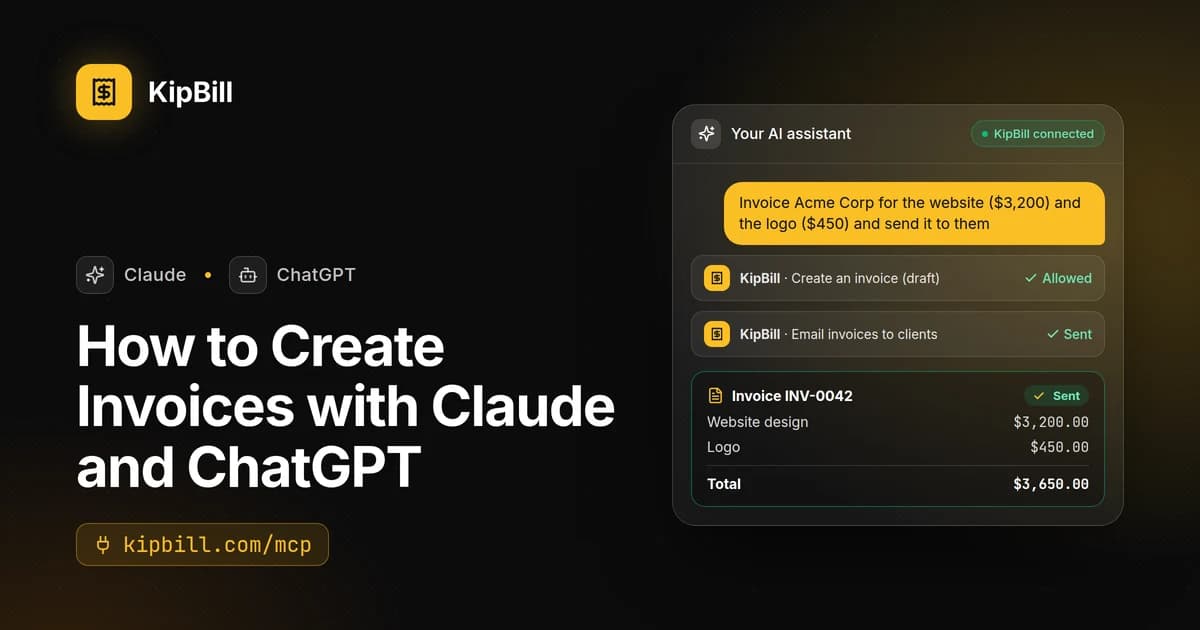
Here is what it looks like once it's connected: one sentence in the chat, the app asks for your OK, and KipBill does the rest.
Invoice Acme Corp for the website ($3,200) and the logo ($450) and send it to them
Done. Invoice INV-0042 for Acme Corp is in KipBill and on its way to ana@acme.com.
Acme Corp · ana@acme.com
What you need
- A KipBill account with your business set up. The free plan is enough. If you don't have one yet, the connection screen lets you create it for free and come straight back.
- Claude on any plan, Free included (Free allows one custom connector), or ChatGPT on a plan or workspace that lets you add your own MCP servers.
- Two minutes. There are no API keys to copy and nothing to install.
MCP (Model Context Protocol) is the open standard that lets AI apps like Claude and ChatGPT use other services safely. KipBill's connector is an MCP server: the AI asks it to do things, and KipBill does them with your account's rules.
Connect KipBill to Claude
These steps work in Claude on the web and in the desktop app. Once added, the connector is also available in Claude's phone apps.
Copy the connector address in KipBill
In KipBill, open Settings → Integrations. Under Claude and ChatGPT you'll find the connector address and the steps for each app. You can also copy it right here:
Connector address
https://kipbill.com/mcp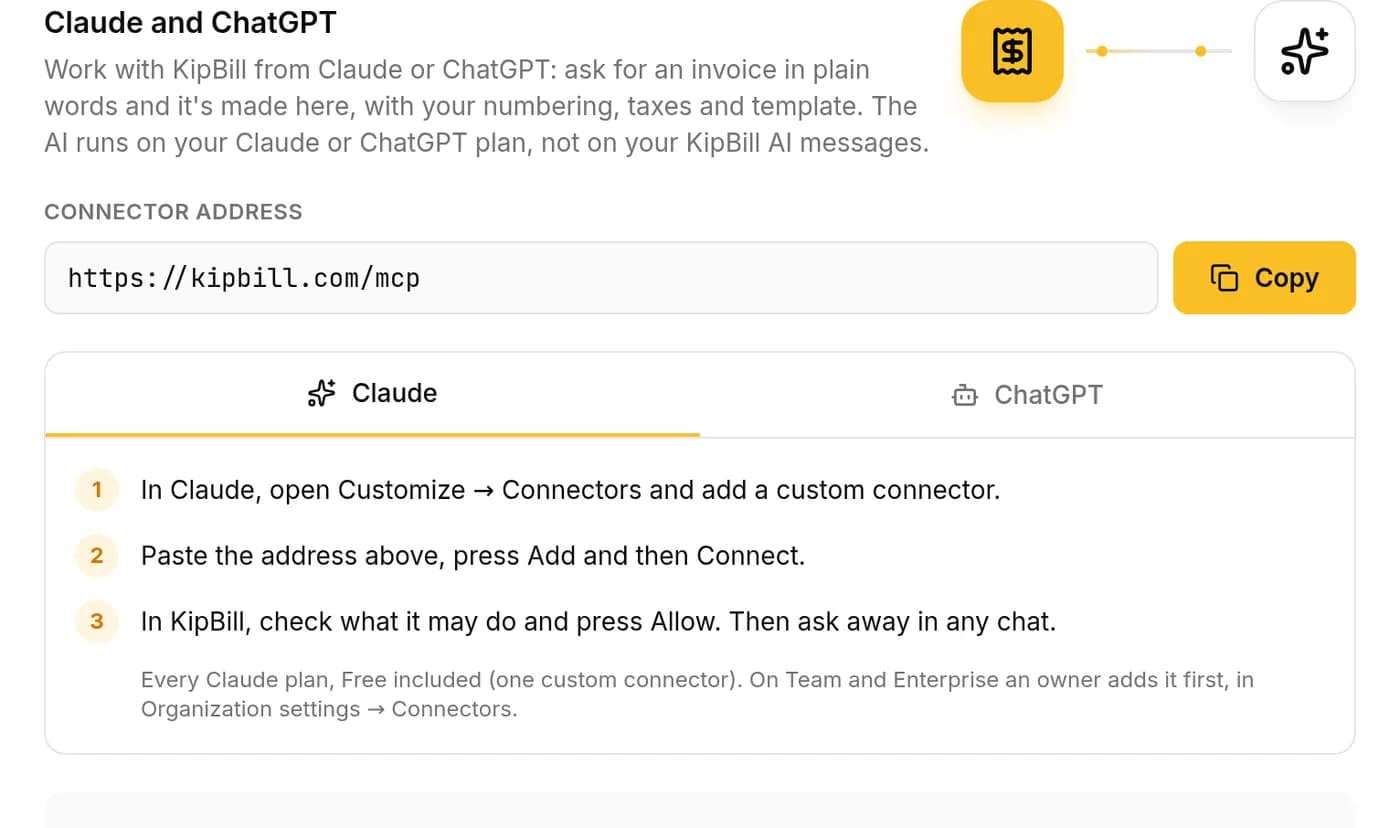
Add a custom connector in Claude
In Claude, open Customize → Connectors and choose Add custom connector. Type KipBill as the name, paste
https://kipbill.com/mcpas the URL and press Add. Then press Connect next to KipBill.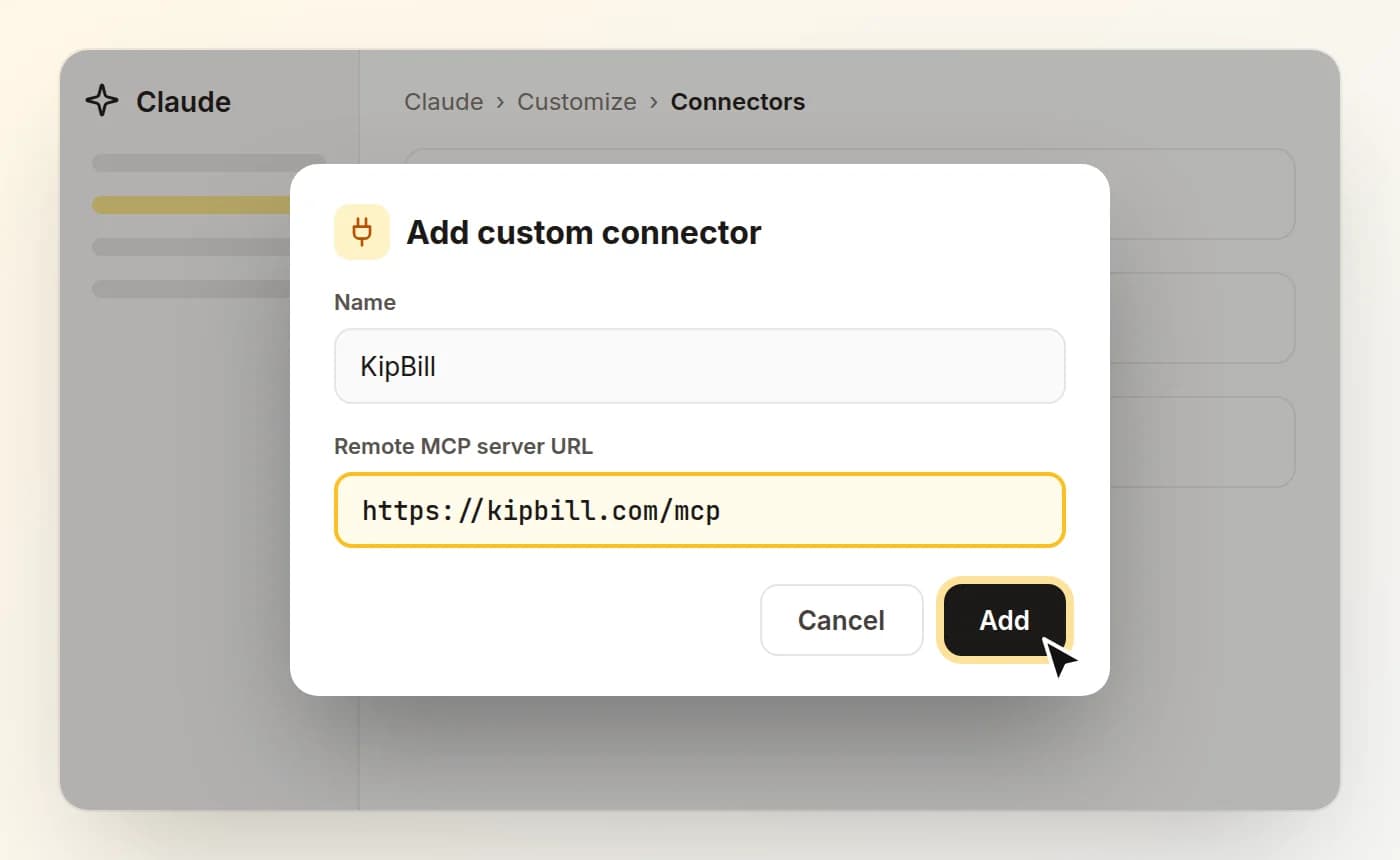
Claude's “Add custom connector” window (illustration). Labels can vary a little between Claude versions. On Claude Team and Enterprise, an owner first adds the connector for the organisation in Organization settings → Connectors; then each person connects their own KipBill account.
Sign in to KipBill and press Allow
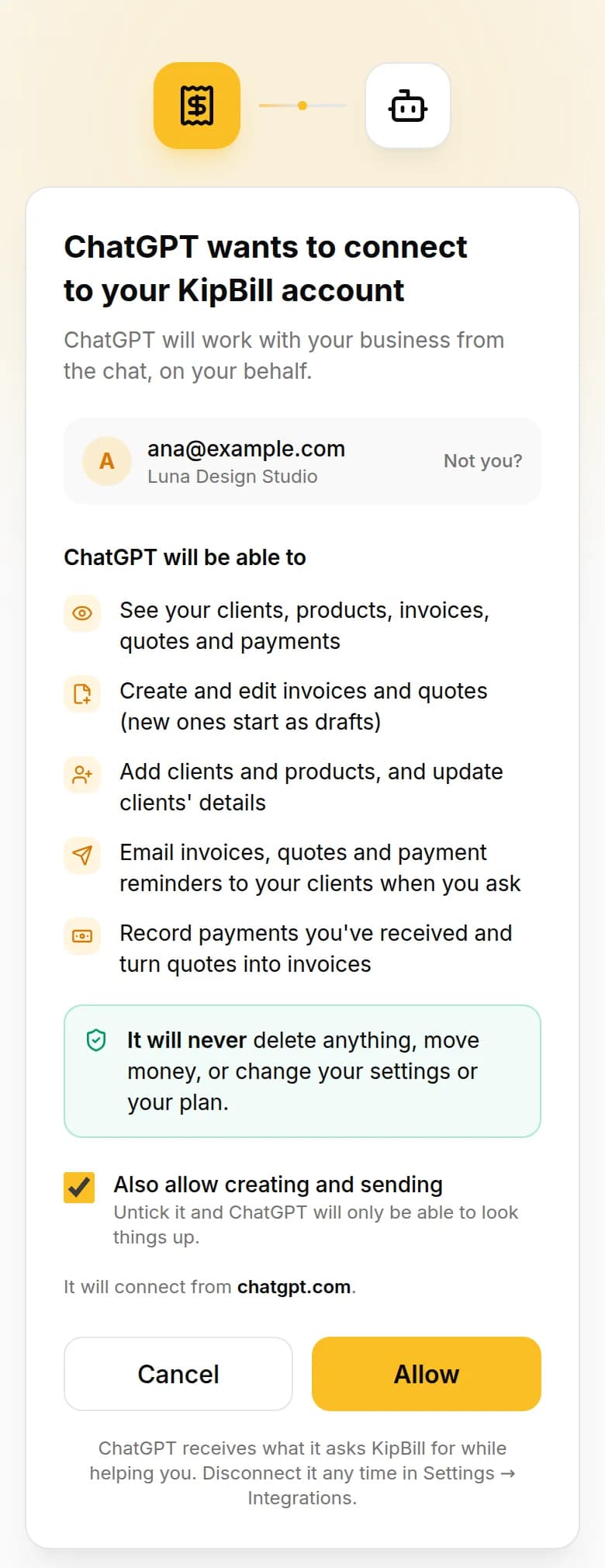
KipBill opens in your browser and shows exactly what Claude will be able to do. If you have several businesses, pick the one Claude should work with (you can ask for another later). Leave Also allow creating and sending ticked to create and send from the chat, or untick it so Claude can only look things up. Then press Allow.
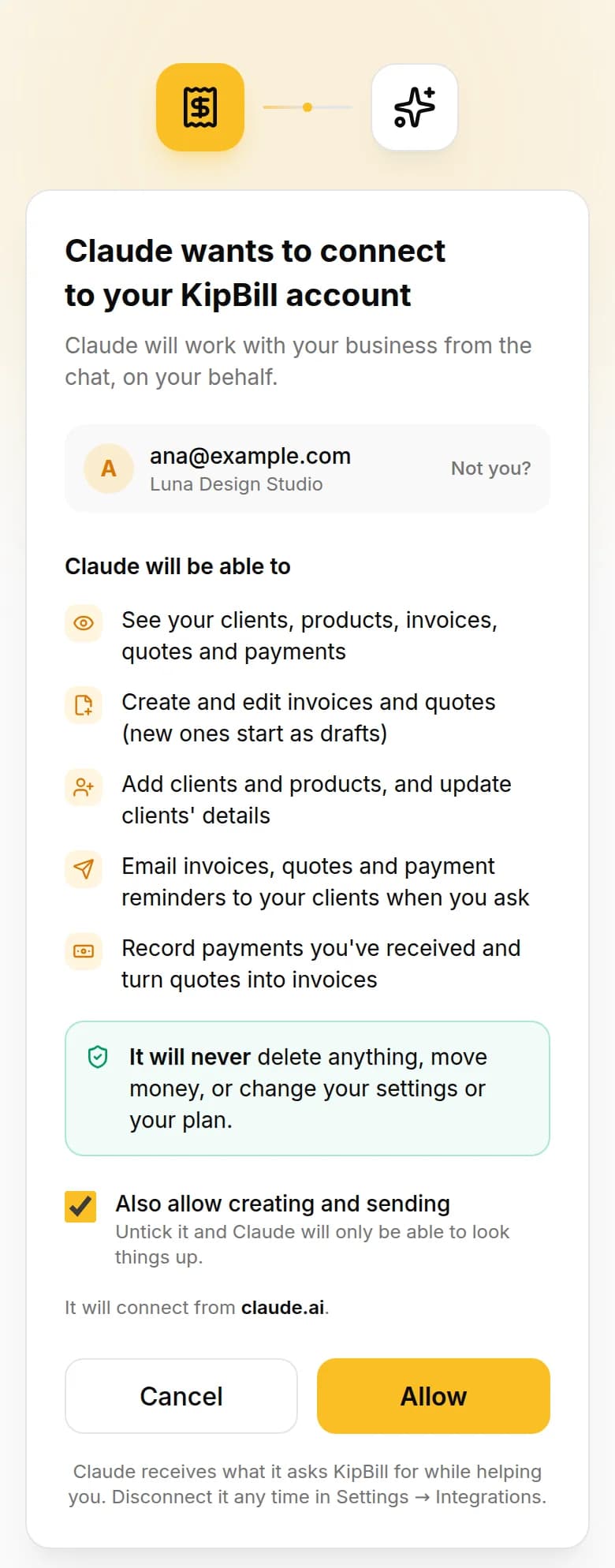
Not signed in yet? The same screen lets you sign in, or create a free account and set up your business in about a minute, and then brings you back here.
Check it in Settings → Integrations
Back in KipBill, Settings → Integrations now lists Claude under Connected apps: which business it works with, whether it can create and send, and since when. Disconnect stops it at once.

That's it. Open a new chat in Claude and ask away.
Connect KipBill to ChatGPT
Add KipBill as a custom MCP server
Open chatgpt.com/plugins, press + and add a custom MCP server. Paste
https://kipbill.com/mcpas the connection, create it as a plugin and install it.Adding your own MCP servers depends on your ChatGPT plan and workspace settings. If you don't see the option, your plan or your workspace admin doesn't allow it yet.
Sign in to KipBill and press Allow
ChatGPT opens KipBill's connection screen. Check what it will be able to do, choose the business and press Allow.
Use it in a chat
In a chat, type @ and choose KipBill, then ask what you need. Settings → Integrations in KipBill lists ChatGPT next to your other connected apps.
Claude Code and other MCP apps
Developers can add the same connector to Claude Code with one command:
claude mcp add --transport http kipbill https://kipbill.com/mcp
Then type /mcp in Claude Code, choose kipbill and sign in. Any other app that supports remote MCP servers with OAuth sign-in connects the same way: give it the address and approve it on KipBill's screen.
What you can ask
The connector works on your real KipBill data: the same clients, prices, taxes and numbering as in the app. Ask in plain words, in your own language. Copy any of these to try them:
Find out
- Who owes me money?
- Which invoices are overdue?
- How much did I invoice in September?
- Show me everything I've invoiced Acme Corp this year
Create
- Invoice Nomad Studio for 10 hours of design at $45
- Make a quote for Gil Renovations valid for 15 days
- Add a client: Lumen Labs, billing@lumenlabs.com
- Turn the last quote for Gil Renovations into an invoice
Send and get paid
- Send INV-0042 to the client
- Remind everyone who is overdue
Starter plan and up
- INV-0042 was paid by bank transfer today
- Move the due date of INV-0045 to November 30
Every answer includes a link to the document in KipBill, where you can review it, download the PDF or edit anything before sending.
Paste a client's email, a timesheet or a purchase order into the chat (or attach the PDF) and ask "invoice this". Claude or ChatGPT reads it, and KipBill makes the invoice with your catalog prices and your taxes.
Why connect instead of asking ChatGPT to "make an invoice"
Ask a chatbot for an invoice and you get text that looks like one. The number is made up, the taxes are whatever you typed, and nothing is saved anywhere. Connected to KipBill, the same request becomes a real invoice in your books:
| Claude or ChatGPT alone | Connected to KipBill | |
|---|---|---|
| Invoice number | Made up; you keep track | Your next number, in order |
| Client details | Typed into every chat | Taken from your client list |
| Taxes and withholding | Whatever you tell it | Your business and client settings |
| The document | Text or a table to copy | A PDF with your template and logo |
| Sending | You email it yourself | Emailed by KipBill; you see when the client opens it |
| Payments | Not tracked | Recorded, with overdue invoices flagged |
| Totals | Worked out by the AI | Calculated by KipBill |
Prefer not to connect anything? Try the free AI invoice generator: describe the invoice in one sentence and download the PDF, no account needed.
What it can and can't do
- It asks you first. Claude and ChatGPT ask for your OK before using a tool that changes your data, unless you've told them to always allow it.
- New documents start as drafts. Invoices and quotes are created as drafts with your next number; they are emailed only when you ask.
- It never deletes or moves money. The connector can't delete documents, move money, or change your settings or your plan.
- Your plan's limits apply. Free includes 5 clients and 10 emails a month; payment reminders need the Starter plan or higher. When a limit stops something, the reply says which one.
- Team roles stay the same. Each person connects their own KipBill account: an editor can create and send, a viewer can only look things up.
- Not yet: credit notes, recurring invoices, expenses and settings. For those, use the app.
Privacy and security
- You sign in on kipbill.com. Claude and ChatGPT never see your password. The connection uses OAuth 2.1 with PKCE, the sign-in standard of MCP.
- KipBill gets requests, not your conversation. It sees, for example, "find the invoices of Acme Corp" and answers with those invoices, nothing else.
- Tokens are kept as fingerprints. KipBill stores only a hash of each access key, never the key itself. Keys last one hour and renew in the background.
- Disconnecting is instant. Settings → Integrations → Disconnect cancels the app's access at once.
- The rest is up to the AI app. What Claude or ChatGPT do with the answers follows their own privacy terms and your settings there.
Troubleshooting
"The app that sent you here isn't registered with KipBill." The sign-in link is out of date. Go back to Claude or ChatGPT and press Connect again: a fresh link fixes it.
Claude doesn't let you add another connector. Claude's Free plan allows one custom connector. Remove one you no longer use, or use a paid Claude plan.
You can't find "Add custom connector" at work. On Claude Team and Enterprise, an owner adds it first in Organization settings → Connectors.
ChatGPT has no option to add an MCP server. Your ChatGPT plan or workspace doesn't allow custom servers yet. Your workspace admin can tell you.
It can look things up but not create. "Also allow creating and sending" was unticked when you connected. Disconnect it in Settings → Integrations and connect again with the box ticked.
Frequently asked questions
Can Claude or ChatGPT create real invoices?
On their own they write text that looks like an invoice. Connected to KipBill, they create the invoice in your KipBill account: your next number, your client's details, your taxes and your template, ready to download as a PDF or email to the client.
Is the KipBill connector free?
Yes. It comes with every KipBill plan, Free included, with that plan's usual limits (Free: 5 clients and 10 emails a month). Your Claude or ChatGPT plan is separate.
Do I need a paid Claude or ChatGPT plan?
Not for Claude: custom connectors work on every Claude plan, and Free allows one. In ChatGPT, adding your own MCP servers depends on your plan and workspace settings.
What is the connector address?
https://kipbill.com/mcp. It is the same address for everyone: each person signs in with their own KipBill account, so there are no API keys to copy.
Can it delete my invoices or move money?
No. The connector can't delete anything, move money, or change your settings or your plan. New invoices and quotes start as drafts, and the app asks for your OK before each change.
Will it email my clients without asking?
Only when you ask it to send something, and Claude or ChatGPT asks for your OK first. Emails go to the client's saved address, with your template and logo.
What does Claude or ChatGPT see of my data?
Only what it asks KipBill for while helping you, such as one client's invoices. KipBill receives those requests, not your conversation. Claude and ChatGPT handle what they receive under their own privacy terms.
Does it use my KipBill AI messages?
No. Those are for the assistant inside KipBill. Through Claude or ChatGPT, the AI work runs on your Claude or ChatGPT plan.
Can I use it on my phone?
Yes in Claude: add the connector once on the web or in the desktop app, and Claude's phone apps can use it too.
How do I disconnect it?
In KipBill, open Settings → Integrations and press Disconnect next to the app. It stops working at once. You can also remove it in Claude or ChatGPT.
Want the full overview of the connector, with every detail in one page? See KipBill for Claude and ChatGPT.
Start invoicing for free
Create professional invoices in minutes with KipBill, like freelancers and small businesses in 40+ countries.

KipBill Team
Related Articles
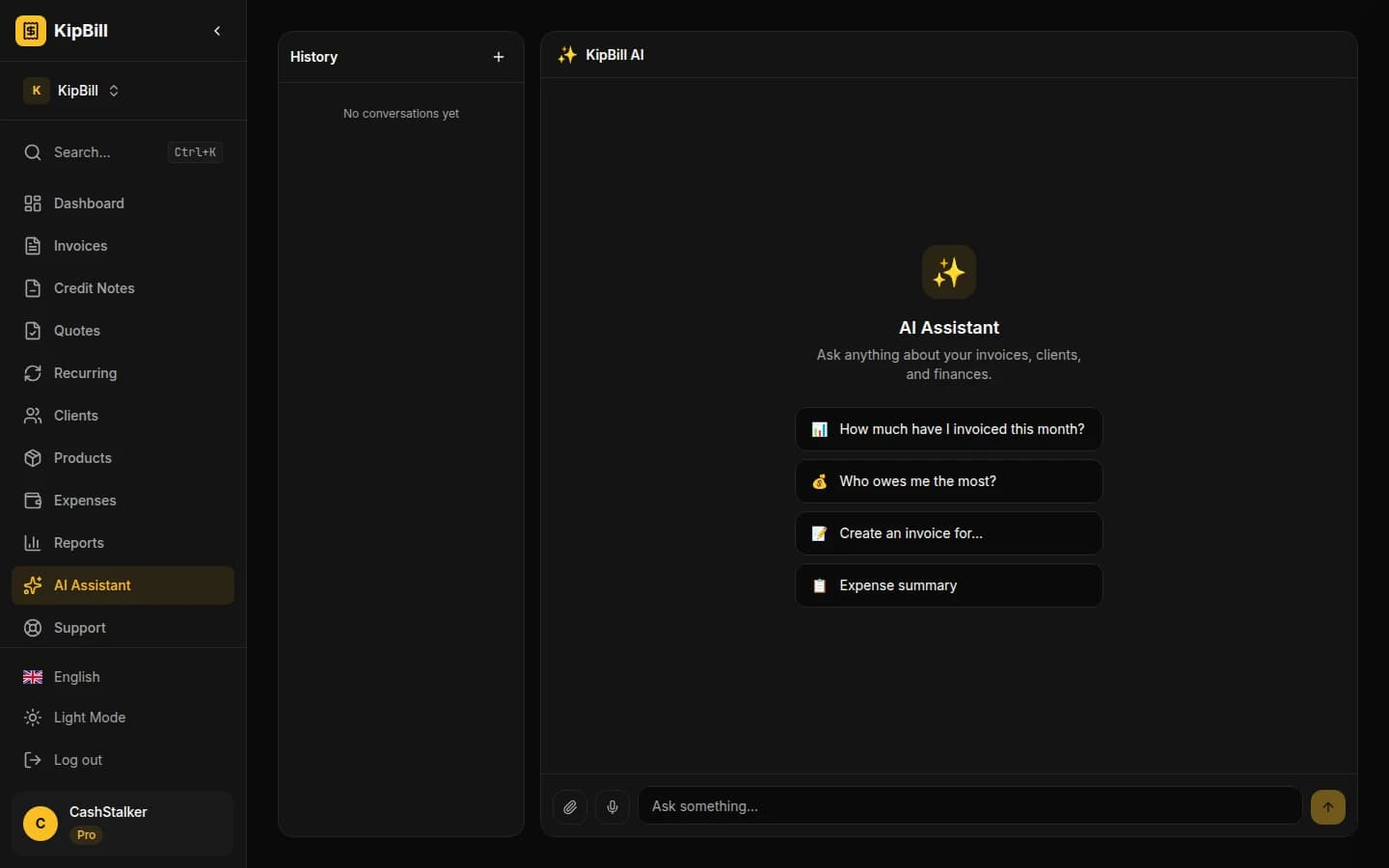
AI Invoice Generator: Create and Send Invoices with Voice and Chat
KipBill's AI invoice generator lets you create, send, and manage invoices by voice or chat. Powered by Claude and OpenAI Whisper. 45 AI tools, 12 languages, free plan available.

How to Invoice International Clients: A Freelancer's Guide
How to invoice international clients: which currency to use, cutting transfer fees, VAT and reverse charge, and the best ways to get paid on time.

Invoicing for Tutors and Teachers: The Complete Guide
How tutors and teachers should invoice students: per-session vs. package billing, recurring invoices, sibling discounts, no-show policies, and parent receipts.
Start invoicing for free
Create professional invoices in minutes with KipBill, like freelancers and small businesses in 40+ countries.